

Monitor, control, and manage your bandwidth with PRTG
- Measure, check, limit, and customize your bandwidth allocation
- Get detailed information about network traffic for better decision-making
- Monitor and adjust the individual bandwidth consumption per device
Our users give top ratings for monitoring with Paessler PRTG





PRTG bandwidth manager:
What you’ll find on this page
PRTG makes LAN bandwidth management easy
Custom alerts and data visualization make it easy to monitor, identify, and prevent network congestion issues
Cure your network congestion nightmares
Sure, you can worry about whether your data flows efficiently from point to point, if important information is getting through security, or what might happen if network issues become user issues. Or, you can kick back on the beach and enjoy knowing Paessler PRTG is your bandwidth management software.

Identify
bandwidth hogs
Bandwidth hogs are those greedy devices on your network that use more bandwidth than they should, slowing down other users. PRTG helps you locate these hogs and manage or limit their bandwidth usage.
This reduces congestion, allowing for faster network speed and fair use for other devices and people on the network.

Monitor bandwidth over the long run
Long-term monitoring often provides for new and interesting findings. PRTG provides a wealth of historical data that gives exponential decision-making power, answering important questions that allow you to appropriately upgrade or expand your network.
Identify peak hours and learn which devices use the most bandwidth to design a more effective network.

Track different
traffic types
Analyze the different types of network traffic so you can manage your bandwidth usage more effectively. VoIP, web browsing, file transfers, and more use network resources at different levels.
Filter data traffic according to IP addresses, protocols, data types, ports, and more, and make sure your traffic is flowing correctly with PRTG.

Limit bandwidth based on specific needs
Some tasks and devices don’t need as much bandwidth as others, so PRTG lets you identify where you can limit bandwidth based on needs. For example, you can limit bandwidth for backups so they don’t take as much.
You can also allocate bandwidth on a router-to-router basis or in switches, or restrict LAN bandwidth by specifying which traffic has priority on the devices connected to your LAN.

Customize your
alert levels
Only receive alerts when they’re absolutely necessary, customized by you to meet your particular needs. You know your network best, so PRTG lets you customize your alerts based on the warning and error thresholds you set.
You can also set the seriousness of the alert and the people to be notified when an alert is triggered.
What bandwidth management looks like in PRTG
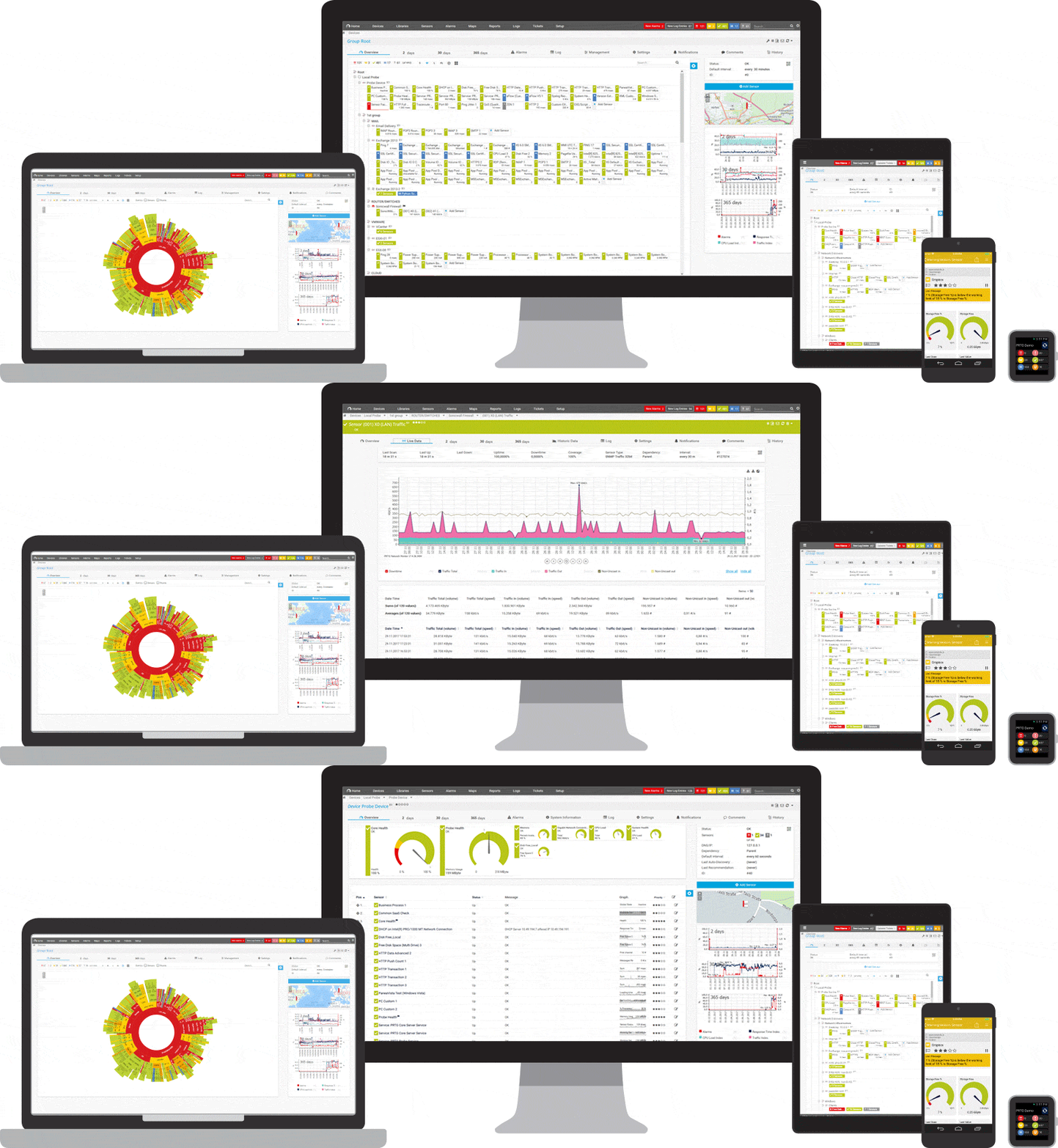
Diagnose network issues by continuously monitoring your device’s bandwidth consumption. Show network usage and traffic patterns in real time and visualize data in graphic maps & dashboards to identify problems more easily. Gain the visibility you need to troubleshoot network congestion.
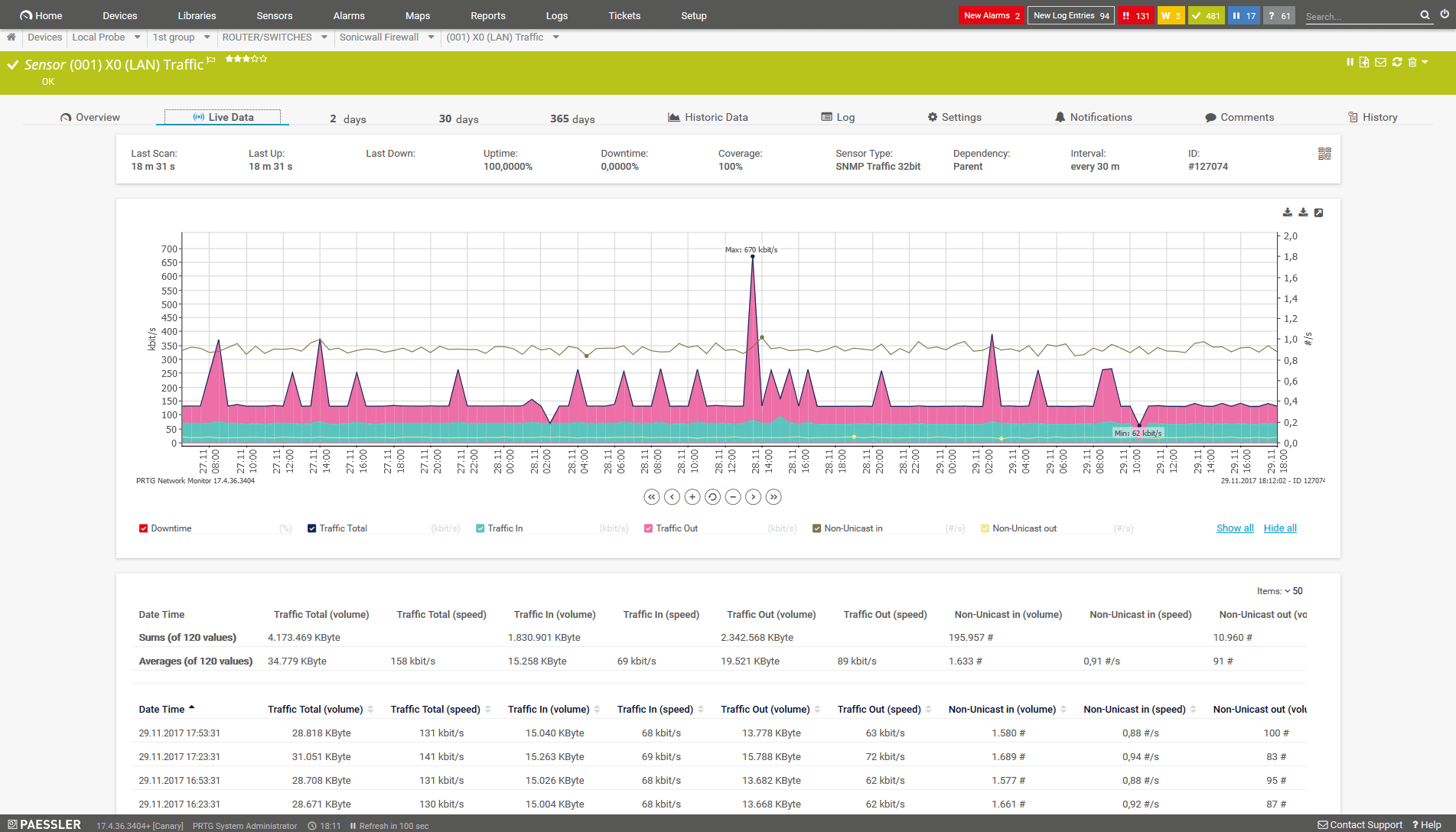
Live data traffic graph of an SNMP Traffic sensor
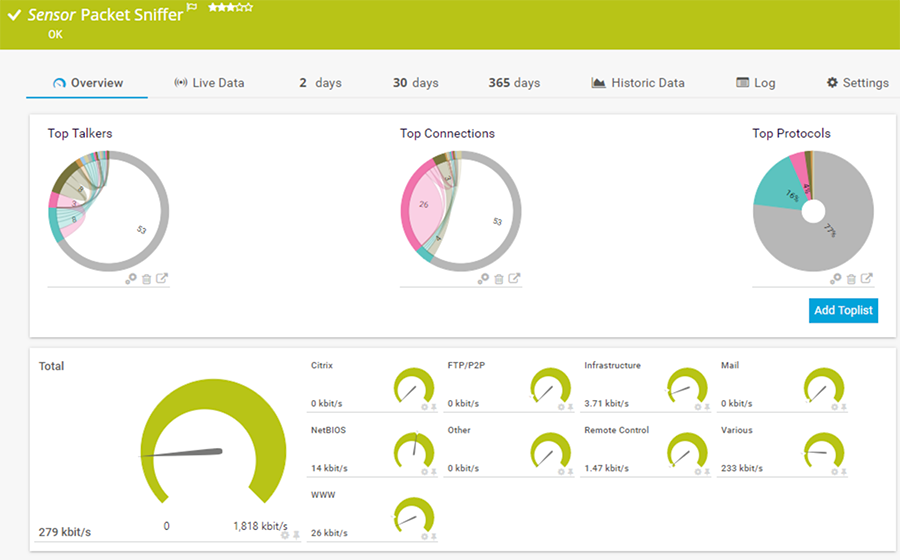
Packet Sniffer sensor in PRTG
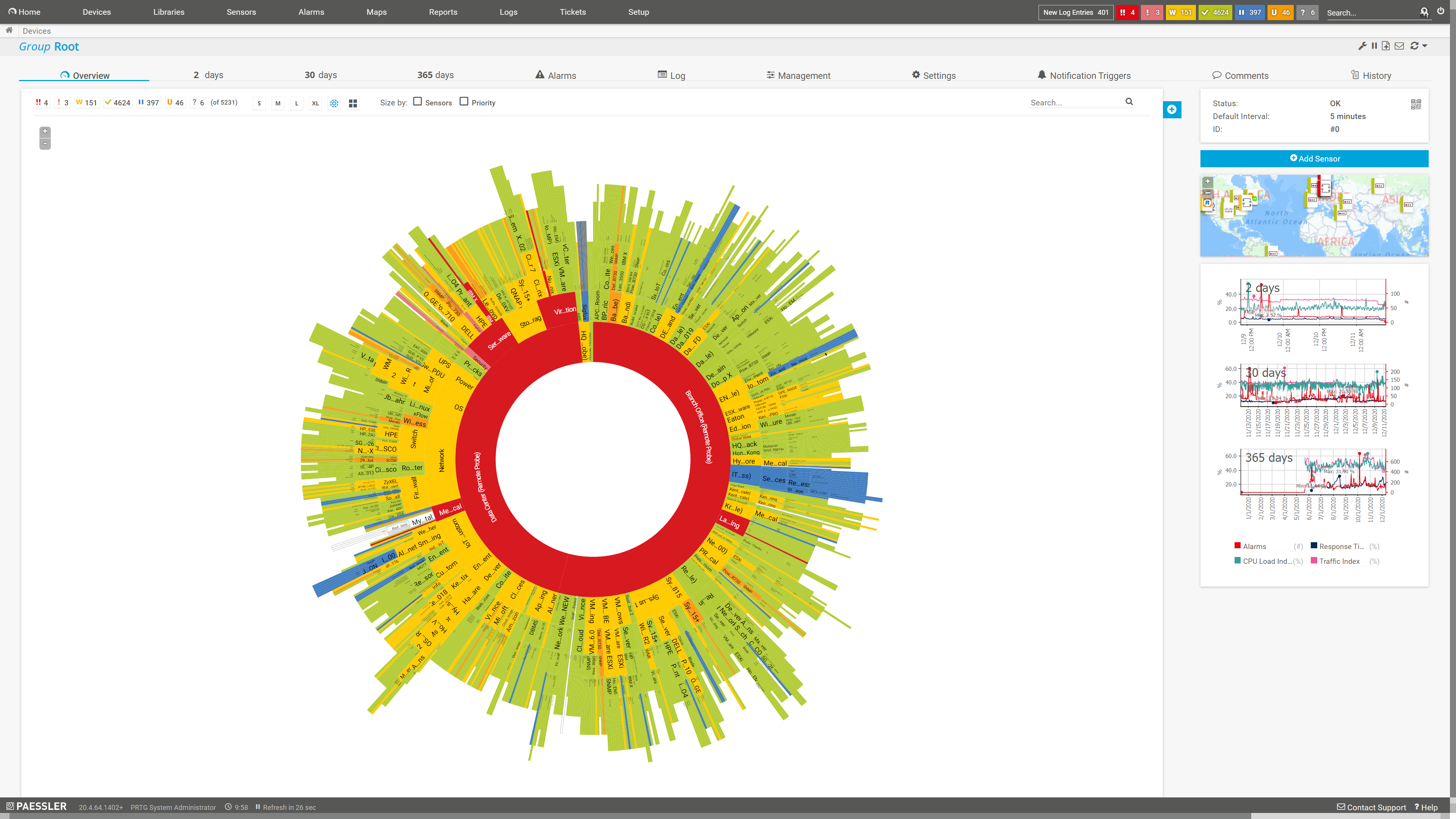
Sunburst view of the entire monitoring setup
Start managing your bandwidth with PRTG and see how it can make your network more reliable and your job easier.
“All-around winning “The real beauty of PRTG is the endless possibilities it offers” “Outstanding cloud IT experts agree: Paessler PRTG is a great solution for IT infrastructure monitoring

network monitor”

monitoring”
3 reasons to choose PRTG as your bandwidth management tool
All-in-one monitoring
Let’s face it: nobody really wants to have five pieces of software to monitor one network. With PRTG, you don’t have to. Our monitoring software can do way more than bandwidth monitoring and management, and also includes an alarm system, reporting, and custom visualization options. If you opt for a license, you’ll get access to its full range of network monitoring features.

Detailed information
Learn what you need to know about your network for optimal performance, less congestion, better data flow, and more efficient usage. PRTG comes with more than 250 preconfigured sensor types out of the box to help you monitor your entire network, including preconfigured SNMP Traffic, Packet Sniffer, and flow (NetFlow, sFlow, jFlow, IPFIX) sensors.

Everything at a glance
Outdated equipment or faulty configurations can also lead to malfunctions. PRTG lets you keep a constant eye on your entire IT environment in one central dashboard. Get an immediate overview or dig down for a more detailed view. Easily set up and configure PRTG and see the network information you need when you need it.
Your bandwidth manager at a glance – even on the go
Set up PRTG in minutes and use it on almost any mobile device.

Watch our 3-minute video about bandwidth monitoring with PRTG
PRTG is compatible with all major vendors, products, and systems

Easily find the source of the problem with our PRTG bandwidth management solution
Real-time alerts and custom notifications make it easy to solve issues with bandwidth consumption.
Create innovative solutions with Paessler’s partners
Partnering with innovative vendors, Paessler unleashes synergies to create
new and additional benefits for joined customers.



UVnetworks
UVexplorer integrates tightly with PRTG to bring fast and accurate network discovery, detailed device inventory, and automatic network mapping to the PRTG platform.

“Excellent tool for detailed monitoring. Alarms and notifications work greatly. Equipment addition is straight forward and server initial setup is very easy. ...feel safe to purchase it if you intend to monitor a large networking landscape.”
Infrastructure and Operations Engineer in the Communications Industry, firm size 10B - 30B USD
PRTG makes LAN bandwidth management easy
Custom alerts and data visualization make it easy to monitor, identify, and prevent network congestion issues.
Manage bandwidth: FAQ
1. What is bandwidth management?
Bandwidth management is an important part of network administration. It makes sure that important applications and devices have the bandwidth they need to operate. It allows informed allocation of network resources, helps you manage your network traffic better, and keeps your network more secure.
2. Can I improve my network speed with bandwidth management?
Yes. Bandwidth management provides a range of management capabilities that positively affect speed. For example, by managing bandwidth allocation, you can reduce network congestion, which has the benefit of improving your network speed.
3. What’s the difference between bandwidth monitoring, bandwidth management, and bandwidth controlling?
With bandwidth monitoring, you won’t yet be actively managing your bandwidth. Instead, you'll simply observe the amount of bandwidth that is consumed by your network’s devices and applications and then make a decision on how best to manage your bandwidth.
Active bandwidth management includes the distribution of bandwidth to the devices in your network. A variety of bandwidth management tools are available to help you manage bandwidth. You can also adjust the individual bandwidth consumption of devices in the respective device’s settings.
Bandwidth controlling is usually used synonymously with bandwidth management. You can use it to measure, check, limit, and customize the distribution of your bandwidth and data rates at any time.
With PRTG, you can control your data rate and test bandwidth. You cannot, however, prioritize traffic. If you wish to prioritize traffic, think about picking up a separate bandwidth controller tool.
4. Can PRTG monitor real-time bandwidth usage?
Yes. PRTG is an all-in-one monitoring solution. Through various sensors, PRTG can track the data passing through your network in real time.
5. Does PRTG reduce network costs?
Absolutely! Studies have shown that PRTG can help lower network costs in several ways. Being able to optimize your network helps reduce the cost of bandwidth upgrades. Another way is through resource allocation. Appropriately allocating network resources makes your network perform better, saving costs on network failures or service interruptions.
6. What is a sensor in PRTG?
In PRTG, “sensors” are the basic monitoring elements. One sensor usually monitors one measured value in your network, for example the traffic of a switch port, the CPU load of a server, or the free space on a disk drive.
On average, you need about 5-10 sensors per device or one sensor per switch port.

PRTG: The multi-tool for sysadmins
Adapt PRTG individually and dynamically to your needs and rely on a strong API:- HTTP API: Access monitoring data and manipulate monitoring objects via HTTP requests
- Custom sensors: Create your own PRTG sensors for customized monitoring
- Custom notifications: Create your own notifications and send action triggers to external systems
- REST Custom sensor: Monitor almost everything that provides data in XML or JSON format
More than just a monitoring tool:
Reasons our customers love PRTG
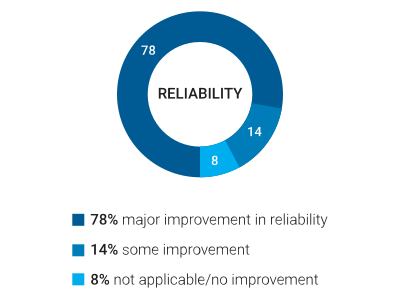
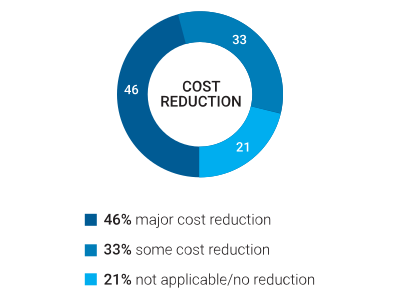
Paessler PRTG is used by companies of all sizes. Sysadmins love PRTG because it makes their job a whole lot easier. Bandwidth, servers, virtual environments, websites, VoIP services – PRTG keeps an eye on your entire network. Everyone has different monitoring needs. That’s why we let you try PRTG for free.Still not convinced?

More than 500,000
sysadmins love PRTG
Monitor your entire IT infrastructure

Try Paessler PRTG
for free

Start managing your bandwidth with PRTG and see how it can make your network more reliable and your job easier.
|
PRTG |
Network Monitoring Software - Version 24.2.94.1400 (April 10th, 2024) |
|
Hosting |
Download for Windows and cloud-based version PRTG Hosted Monitor available |
Languages |
English, German, Spanish, French, Portuguese, Dutch, Russian, Japanese, and Simplified Chinese |
Pricing |
Up to 100 sensors for free (Price List) |
Unified Monitoring |
Network devices, bandwidth, servers, applications, virtual environments, remote systems, IoT, and more |
Supported Vendors & Applications |


|
Combining the broad monitoring feature set of PRTG with IP Fabric’s automated network assurance creates a new level of network visibility and reliability.